user account create leptop
Step1 : Windows + R
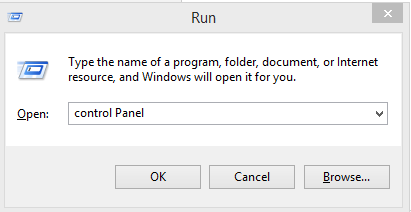
Step2 : Open input type - Control Panel

Step3 : Control Panel Open
Step4 : User Accounts

Step5 : Account name,type, password Choice

Step2 : Open input type - Control Panel
Step3 : Control Panel Open
Step4 : User Accounts

Step5 : Account name,type, password Choice


it is really working this idea....it is to good....& really really amazing.....i love it...😊😊😊
ReplyDeleteYour working Idea is Very Helpful to all of us... I really appreciate and thanx to help us... Without any types of conditions.... Thank you so much being with me and all of us who has attached with uh....
ReplyDeleteYour working Idea is Very Helpful to all of us... I really appreciate and thanx to help us... Without any types of conditions.... Thank you so much being with me and all of us who has attached with uh....
ReplyDeleteyour working idea very helpful to all of us
ReplyDeleteyour working idea very helpful to all of us
ReplyDeleteBest work
ReplyDelete